What is Dynata? Why you’re getting calls and how to stop them


If Dynata is calling or texting you, it usually means your number is on a market research contact list. Although it’s a legitimate company, Dynata calls may arrive without context or repeatedly, which could cause someone to mistake them for spam or scam calls. Scammers have also been known to use the Dynata name to appear more convincing.
So are the calls you’re getting spam or not, and can you make them stop?
What is Dynata?
Dynata is a global market research company that collects data primarily through surveys. It works with businesses to understand consumer behavior, preferences, and opinions. For example, it might help a company collect data that can be used to improve products or services.
Dynata builds detailed profiles based on the information collected. This includes over 2,700 attributes, covering areas such as shopping habits, interests, technology usage, travel preferences, and demographic information.
To do this, Dynata uses large panels of people who have agreed to participate in research. They may be recruited through a variety of channels, including loyalty programs, websites, mobile apps, partnerships, and online communities. It may contact you through phone calls, texts, emails, or apps, inviting you to complete surveys or join studies.
However, not all contact comes from deliberate sign-ups. Dynata's privacy policy states that it may receive your data from third parties, including partner organizations, research panels, and third-party data providers. This means you might receive contact from Dynata even if you don’t remember signing up.
How did Dynata get my number?
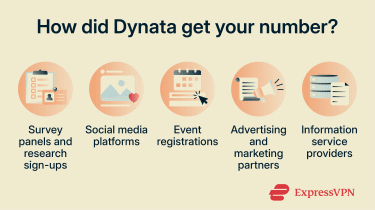 If you don’t remember giving Dynata your phone number, its privacy policy states that it may obtain information from a variety of third-party sources, including:
- Survey panels and sample suppliers: Other research companies or survey providers that share participant data with Dynata.
- Social media platforms: Networks that may pass on information from your profile or activity.
- Industry, conference, or event organizers: Companies that collect contact details through registrations.
- Marketing and advertising platforms: Businesses involved in marketing, analytics, or audience targeting that may share consumer data.
- Information service bureaus: Companies that collect and organize public consumer information for research or commercial use.
Learn more: Should you pick up calls from unknown numbers? Find out how to block unknown callers from contacting you.
Why you may receive repeated survey calls
Survey companies like Dynata often try to reach people more than once. If you don’t answer, your number may stay on the contact list while the survey is still active. You may get another call later, especially if your number matches the type of person the research is looking for.
In some cases, you may receive survey invitation calls from multiple research companies. This can happen when you participate in more than one survey panel or when research companies work with partners to recruit survey participants.
Is Dynata legit or a scam?
Many of Dynata's calls are real survey requests. However, scammers can also pretend to be Dynata, so it’s important to look at each contact carefully.
When a Dynata call is legitimate
A real Dynata call typically focuses on gathering opinions, not selling products. During the call, you’ll usually be asked simple questions about your habits or experiences. This might include how you shop, what products or services you use, or your views on certain topics.
You may also be asked basic details like your age group or general location to help put your answers into context.
Legitimate surveys generally focus on research participation rather than purchases, account verification, or financial transactions.
One important distinction is that taking part is optional; you can choose whether to continue or end the call at any time. Sometimes, there may be a small incentive for completing a survey, such as rewards or points, although this isn’t always guaranteed.
How to spot spoofed Dynata calls or fake Dynata texts
Unfortunately, some Dynata-related scams look very similar to real survey invitations, whether that’s a call, email, or message.
Here are some common signs to watch for:
- Vague or unclear communication: The call or text doesn’t clearly explain the survey or gives little detail about who it’s for.
- Requests for sensitive information: You’re asked for financial details, login credentials, or verification codes.
- Rewards that seem too good to be true: Large payouts are offered, with urgency designed to get you to act quickly.
- Aggressive or unprofessional behavior: The caller pressures you to act quickly or may become rude when you question them.
Caller IDs can also be misleading. Scammers can spoof the name and number shown on your phone so it appears to come from Dynata (known as ID spoofing).
Another technique, called neighbor spoofing, allows a scammer to make a call look like it’s coming from a local number. It’s best not to rely on caller ID alone to decide whether a call is genuine.
How to stop Dynata calls
Ask Dynata to put you on its no-contact list
Dynata provides phone numbers you can call if you want your details to be added to the company’s no-contact list and removed from future survey outreach.
- North America: 1-833-757-1746
- Outside North America: 1-801-341-0764
There are also separate contact numbers for questions or concerns about a call you received:
- North America: 1-866-360-9678
- Outside North America: 1-801-379-4094
Adding your details to Dynata's no-contact list is typically more effective than blocking individual numbers because it addresses future survey outreach at the source.
Block Dynata numbers on your phone
Most smartphones include built-in blocking features, so you can usually do this directly from your call history.
Keep in mind that this only blocks individual numbers. If calls continue, you may need to try other methods, such as spam call protection tools.
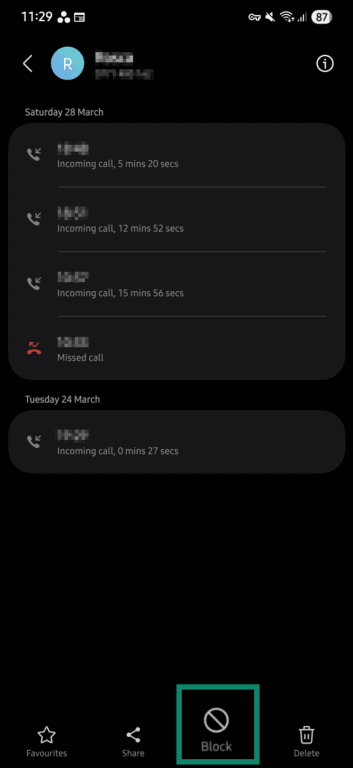
Block Dynata calls on Android
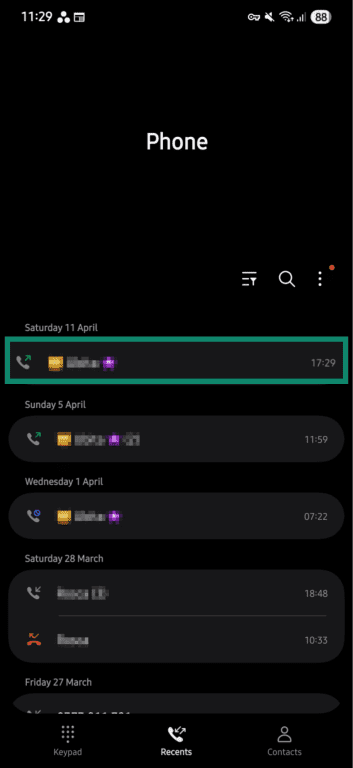
- Open the Phone app to see your recent calls and tap the number you want to block.
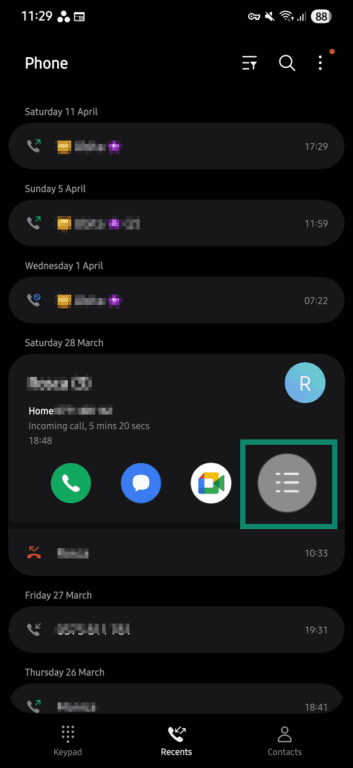
- Tap the burger menu icon.
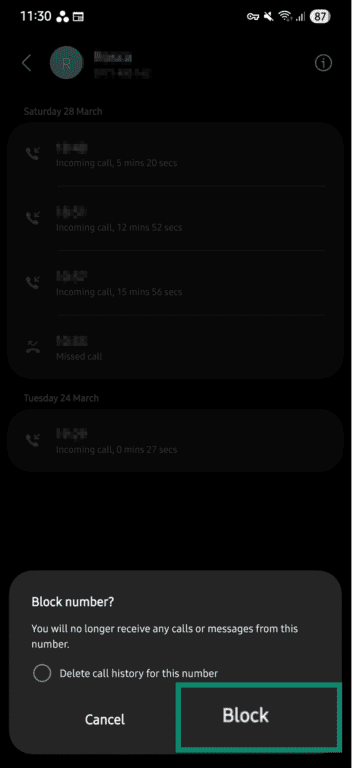
- Tap Block.
- Select Block again from the pop-up menu.
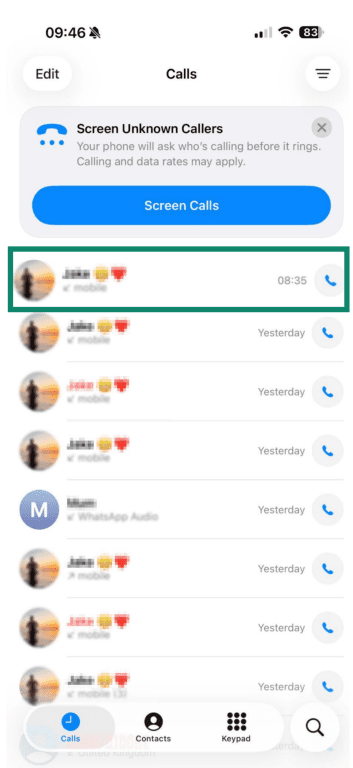
Block Dynata calls on iPhone
- Open the Phone app to see the list of your recent calls, and tap on the caller you’d like to block.
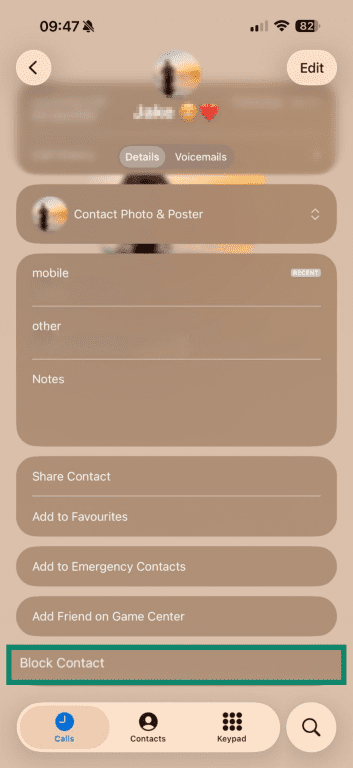
- Scroll down and tap Block Contact.
What to do if the calls continue
If calls continue after you ask to be added to Dynata’s no-contact list, you can take additional steps to limit contact, document the calls, or submit a privacy request.
Submit a privacy request
Dynata's privacy policy provides several privacy and data rights, including the ability to opt out of certain communications and request access to or deletion of your information. You can:
- Opt out of receiving survey calls or messages.
- Opt out of certain types of data collection, including some automated tracking.
- Withdraw consent you’ve previously given for your data to be used.
- Request access to the data Dynata holds about you.
- Ask for your data to be corrected, restricted, or deleted.
- Request a copy of your data so you can move it to another service.
You can submit opt-out requests by logging into your Dynata account and updating your preferences, or by contacting the company’s support email: custsupport@dynata.com.
Report unwanted calls
It’s worth reporting calls if they continue after you’ve opted out, occur frequently, or seem suspicious. Tracking calls helps when it comes to reporting spam and scammers, as regulators often rely on details to investigate complaints.
Try to note:
- The date and time of each call.
- The phone number used.
- How often the calls happen.
- Any details shared during the call, such as the company name or reason for calling.
You can report nuisance calls to the relevant regulator, such as the Information Commissioner's Office (U.K.) or the Federal Trade Commission (U.S.).
Use spam call protection tools
If you suspect that you might be getting fake Dynata calls, you can also use built-in phone features or carrier tools to help filter spam and scammers.
For example, some services label incoming calls as “spam risk” or “scam likely,” while others block calls from numbers linked to spam reports.
Stop unwanted calls on iPhone
On iPhone, you can silence unknown callers:
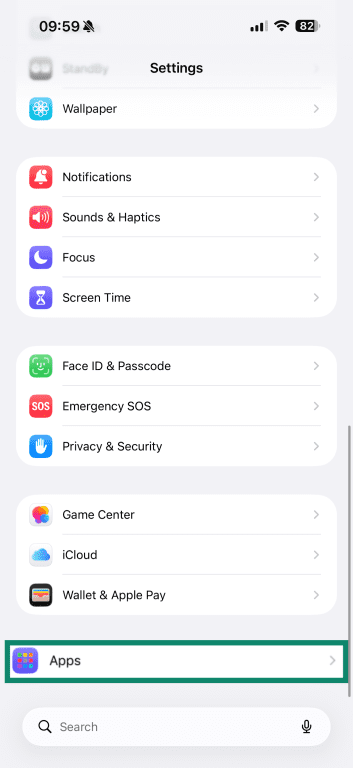
- Open Settings and tap Apps.
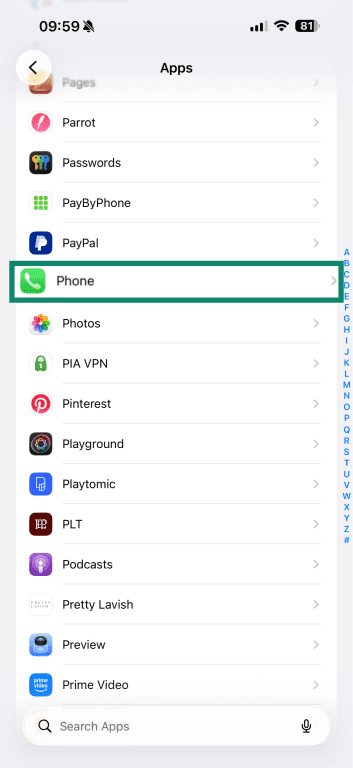
- Tap Phone.
- Under Screen Unknown Callers, turn on Silence.
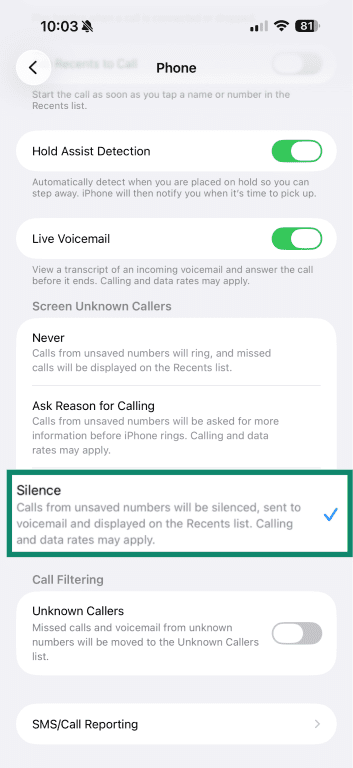
You can also select the Ask Reason for Calling option, which asks callers why they’re calling before your iPhone rings rather than silencing them entirely. You can then decide whether to answer or not.
Stop unwanted calls on Android
On Android, you can enable spam protection in the Phone app. The settings give you the option to filter spam calls or block all unknown numbers.
Filter spam calls
On Samsung phones, Android works with Hiya, a spam and fraud call protection service, to identify potential scam numbers. Here’s how to enable the service:
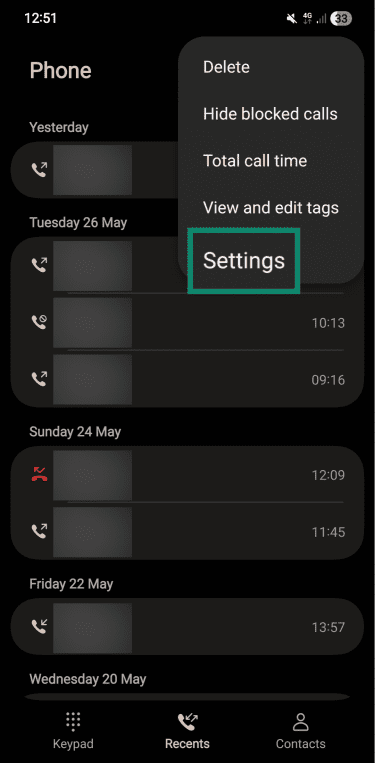
- Open the Phone app and tap the menu (three dots).
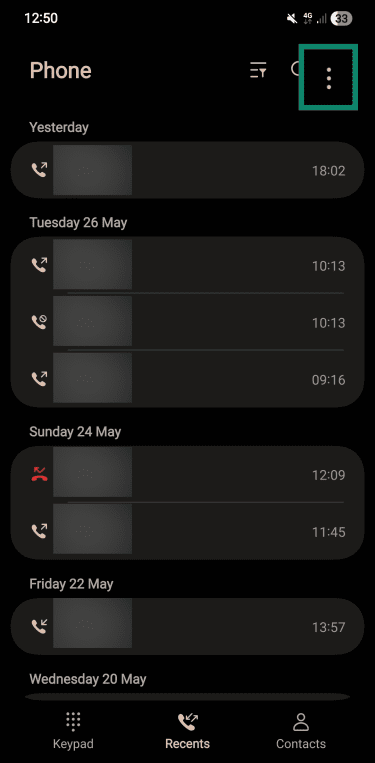
- Tap Settings.
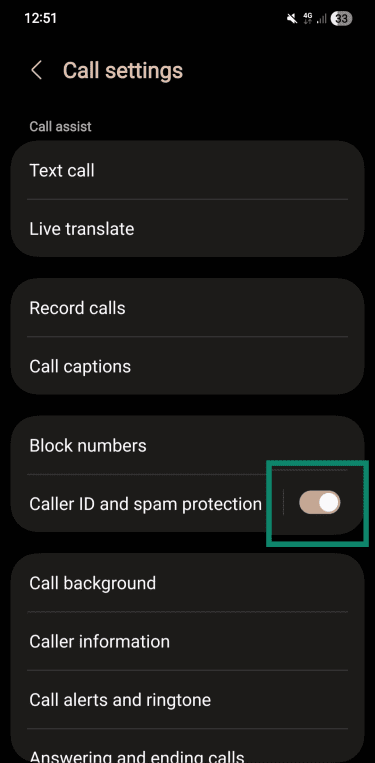
- Make sure Caller ID and spam protection is toggled on.
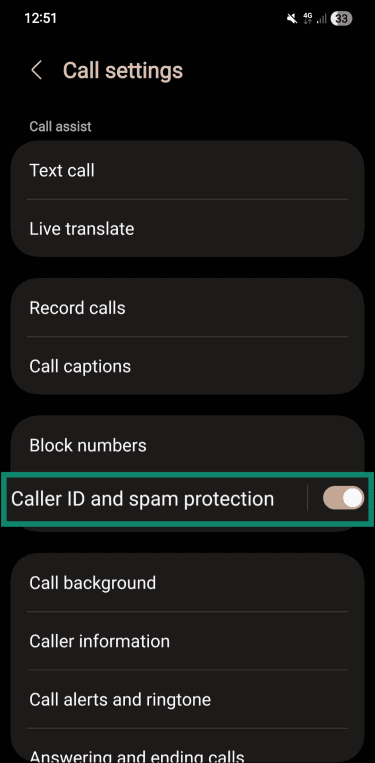
- To fine-tune your spam call protection settings, you can also tap the whole Caller ID and spam protection tab.
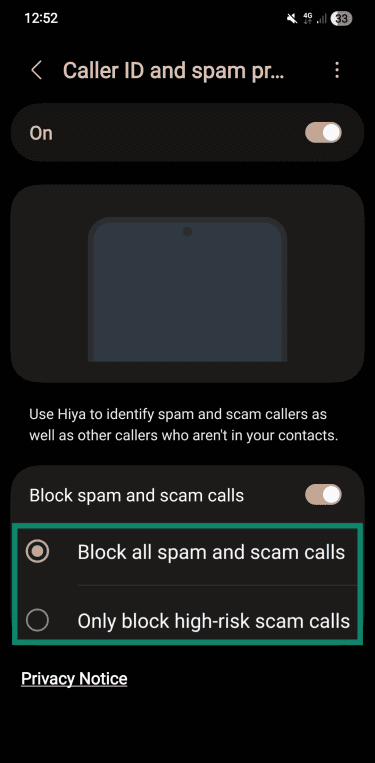
- Here, you can choose between Block all spam and scam calls or Only block high-risk spam calls.
Block all unwanted calls
If you’d prefer to block all unknown numbers instead, here’s how:
- Open the Phone app and tap the menu (three dots).
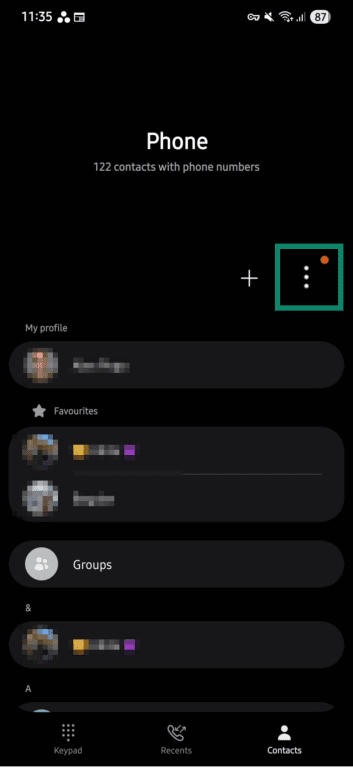
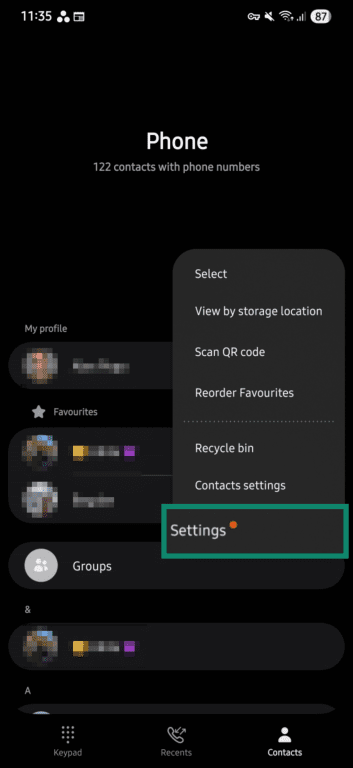
- Go to Settings.
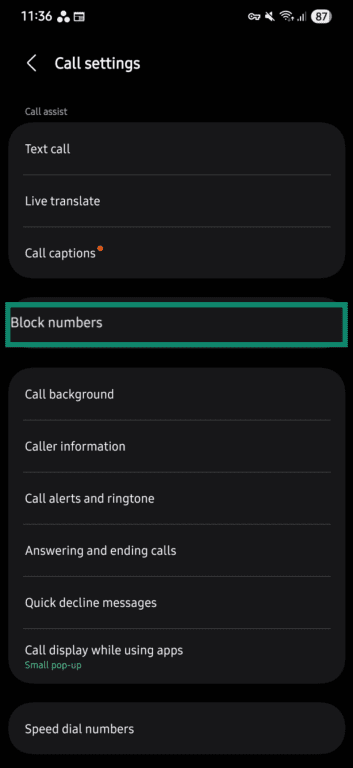
- Tap Block numbers.
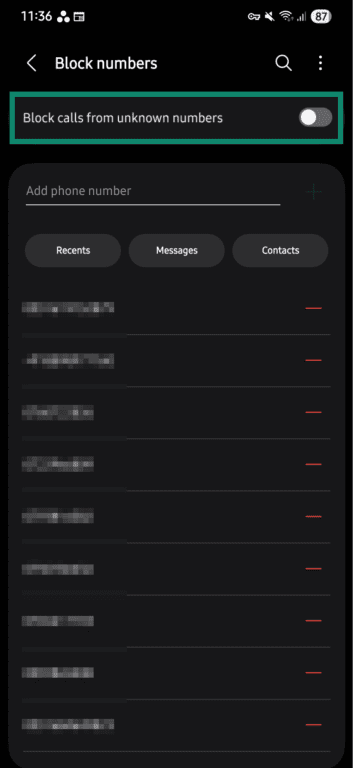
- Tap the toggle next to Block calls from unknown numbers.
Certain mobile carriers may also offer their own tools that detect and block robocalls before they reach your phone, or send them straight to voicemail.
These tools rely on shared databases of reported numbers and calling patterns, so they can warn you about a call, silence it, or block it automatically. However, they’re not perfect, and survey calls aren’t always flagged as spam, so some may still get through.
How to limit who has access to your phone number
Here are a few things you can try to limit who has access to your number.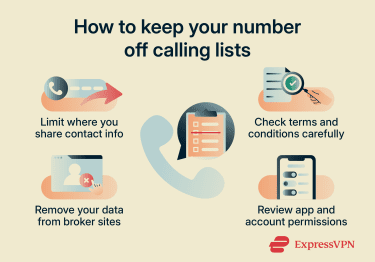
Limit where you share your phone number
Be careful when signing up for competitions, offers, or loyalty programs, or creating accounts for apps and websites. If providing your number is optional, leave it out.
Depending on the service, you may also be agreeing to data-sharing, research, or marketing-related terms. This is often included as part of a longer agreement and can be easy to miss, so be sure to read the small print.
Review privacy settings on apps and accounts
Apps and online accounts can share your phone number depending on your settings, so it’s worth checking what you’ve allowed.
Go into your account settings and look for options around data sharing, marketing, or third-party access. You can also check your phone’s permissions to see which apps have access to your contacts or other data. If an app doesn’t require access to this information to work, remove it.
Remove your information from data broker sites
Your phone number may already be in databases you’ve never heard of. This can happen when companies share, license, or otherwise make data available to other organizations.
You can try to remove your number by submitting opt-out requests to data broker sites. This usually means searching for your name or phone number on their websites and filling out a request form to have your details removed.
There are also tools designed to handle this for you, such as ExpressVPN Identity Defender (for eligible U.S. subscribers only). Identity Defender includes a data removal feature that scans broker sites for your information, submits removal requests on your behalf, and continues to monitor those sites to help keep your data from reappearing.
FAQ
Can Dynata leave voicemails?
Does answering a survey call confirm your number is active?
Can Dynata call from different phone numbers?
What should I do if a caller claiming to be Dynata asks for sensitive information?