
Expressvpn Glossary
Network file system
What is a network file system?
A network file system lets computers access files stored on a remote server using the same operations they would use on their own disk. Clients mount the shared directory into their own file system, so remote storage appears and behaves like a local folder, with network details hidden from users and applications.
Network file systems are widely used across enterprise environments, where many systems need consistent access to the same data without storing multiple copies on each machine. In Linux and Unix contexts specifically, the Network File System (NFS) refers to the original protocol that gave the category its name.
How does a network file system work?
A network file system operates on a client-server model, where one machine offers storage, and others connect by mounting a remote directory.
File requests are then transmitted over the network using a sharing protocol such as NFS or Server Message Block (SMB), which defines how the client and server perform basic file operations such as open, read, write, and close.
The server typically enforces permissions and file locks. Authentication mechanisms such as Kerberos or directory-based login systems verify the client's identity and help determine what it can access. Locks help prevent conflicts when multiple clients access the same file simultaneously.
To reduce the need for repeated network trips, clients often use caching. Clients can serve cached metadata or file contents locally for a short time, reducing traffic and improving responsiveness.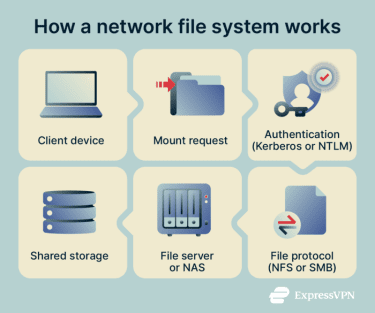
Common network file-sharing protocols and file systems
Network file systems can be grouped by protocol design and architecture.
- NFS: Widely used in Linux and Unix environments, it allows systems to access remote directories as part of their local file systems and is standardized through the Internet Engineering Task Force (IETF).
- SMB: The dominant file-sharing protocol in Windows environments. It supports shared access to files and other network resources between machines.
- Distributed file systems: Designed to scale beyond a single server by spreading storage and coordination across multiple systems.
- Andrew File System (AFS): An early distributed file system built to provide location transparency across networks.
- CephFS: A Portable Operating System Interface (POSIX)-compliant file system built on top of the Ceph distributed storage platform.
- GlusterFS: A scalable, distributed file system that aggregates storage across multiple servers into a unified system.
- Web Distributed Authoring and Versioning (WebDAV): An extension of HTTP that supports remote authoring and file-like resource management over web protocols. It sees some use for remote file access in cloud and collaboration environments, but is less common for traditional enterprise file sharing.
Why are network file systems important?
Network file systems centralize data while keeping it accessible to many users and systems. They support collaboration, simplify management, and improve operational control.
Multiple users can work on the same files from different machines without transferring copies back and forth, reducing version conflicts and storage waste from duplicates.
Centralized storage also means backups, updates, and storage management happen in one place, so administrators protect and maintain the server rather than every individual device.
In virtual desktop infrastructure (VDI) or thin-client environments, user files and profiles reside on central servers, allowing users to log in from different devices and continue working with the same data and settings.
Administrators can also manage permissions at the server level, making it easier to review who accesses which files and supporting compliance, auditing, and security monitoring.
Where is it used?
- Enterprise file servers and network-attached storage (NAS) systems: Organizations use centralized file servers and NAS to store documents, application data, and shared resources across departments.
- Home and small-office networks: Shared drives on home routers or small NAS devices let multiple computers access the same photos, backups, or media files over a local network.
- Development environments: Software teams have traditionally used shared storage for build artifacts, logs, and test outputs. Modern continuous integration and continuous deployment (CI/CD) pipelines have reduced this reliance on traditional network file shares for some workflows, especially for source code storage, though shared storage still plays a role in some environments.
- Media production workflows: Video editing, animation, and design teams use high-capacity shared storage so multiple workstations can access large media files during collaborative projects.
- Research labs and high-performance computing (HPC) clusters: HPC environments use shared file systems, enabling compute nodes to access common datasets, software, and simulation outputs during distributed processing tasks.
Risks and privacy concerns
Because network file systems expose shared storage across multiple machines, security weaknesses can affect many systems at once. Several factors make network file systems particularly vulnerable:
- Weak authentication: If authentication mechanisms are outdated or poorly configured, attackers who compromise one machine may use shared file access to move deeper into a network. Shared administrative credentials and trust relationships increase this risk.
- Overly broad export settings: Improperly configured file shares can expose sensitive directories to unauthorized users or, in some cases, to the public internet.
- Poor SMB and new technology local area network manager (NTLM) configuration: In Windows-based networks, attackers may exploit weaknesses in NTLM authentication or perform SMB relay attacks to impersonate legitimate users if administrators don’t enforce protections such as SMB signing. Newer Windows versions have strengthened defaults, but legacy systems and older configurations may still be at risk.
- Unencrypted traffic and exposed metadata: If file-sharing traffic is not encrypted, attackers may be able to observe file contents as well as metadata such as filenames, directory structures, and access patterns. Even with stronger protections, some metadata may still reveal sensitive information depending on the system and configuration.
- Unrestricted shared drive access: Because shared storage is accessible to many systems, ransomware that infects one device can encrypt files across network shares, amplifying operational damage.
Further reading
- Network File System (NFS): A secure guide for remote access
- What is network-attached storage (NAS)?
- EternalBlue explained: What it is and how to stay safe
- What is NTLM? Understanding this legacy authentication protocol
- What is data exfiltration? A complete guide