 Celebrate with up to 80% off
What is an AI assistant? How they work, benefits, and real-world uses



From answering questions and scheduling appointments to generating content and assisting with customer support, artificial intelligence (AI) assistants are becoming a familiar part of how people interact with technology. Their growing capabilities are changing the way individuals and organizations access information, complete tasks, and manage daily workflows.
What is an AI assistant?
An AI assistant is software that responds to user requests and helps complete tasks through a conversational interface. Instead of clicking through menus or writing code, the user describes what they need in everyday language and the assistant produces a response or takes an available action. Common AI assistants accept text or voice input, and many now also handle images, audio, or uploaded files.
Capabilities vary. A basic assistant answers questions from a fixed knowledge base or follows preset commands. A more advanced one connects to apps, calendars, files, databases, or APIs to retrieve information and complete tasks inside other tools.
How AI assistants differ from AI agents
AI assistants and AI agents share a foundation but differ in how much initiative the system takes.
AI assistants are reactive: they perform tasks at the user's request. A user might ask one to summarize a meeting transcript, rewrite an email, or explain a technical term, then review and act on the output
AI agents go further. A modern generative AI agent often uses a large language model (LLM) to decide its next steps and select its tools as it works toward a goal. Ask an assistant to plan a trip, and it returns options for the user to review. Ask an agent to plan the same trip, and, if connected to the right tools and authorized to do so, it may search for flights, identify options that fit the budget, reserve a hotel for matching dates, add details to the calendar, and come back when a decision or approval is needed.
The line isn't always clean, and a single product often does both. Microsoft Copilot, for example, behaves like an assistant when drafting an email and more like an agent when configured in Copilot Studio to run multi-step workflows or act through connected tools. What matters is whether the system is simply responding to instructions or working more independently toward a goal.
Both categories are scaling fast in enterprise settings. OpenAI’s State of Enterprise AI report says weekly messages inside ChatGPT Enterprise grew roughly eightfold over the past year. And Statista forecasts that the number of active AI agents inside companies worldwide will rise from 28.6 million in 2025 to over 2.2 billion by 2030.
Read more: How to use AI in your daily life (turn AI into your personal assistant).
Examples of popular AI assistants
A market research company, Kantar, reported that AI assistants are already part of everyday routines for many consumers globally, especially younger ones. In its study, 83% of Gen Z and 81% of Millennials reported using AI assistants weekly or daily.
Several products are especially recognizable. The list below isn’t exhaustive, but it covers well-known assistants and where each commonly appears:
- ChatGPT (OpenAI): The assistant that brought generative AI into everyday use after its November 2022 launch. According to a UBS study quoted by Reuters, it was the fastest consumer app in history to reach 100 million users, passing that mark in roughly two months. OpenAI reported 900 million weekly active users in February 2026.
- Claude (Anthropic): Claude is an AI assistant built on Anthropic's research into helpful, honest, and harmless systems, with a focus on reliability, predictability, and steerability. It’s widely used for writing, analysis, and coding.
- Gemini (Google): Integrated into Google products including Search, Workspace apps, and Android, with availability varying by region, account, and plan.
- ExpressAI: A privacy-focused AI assistant built on confidential computing. Prompts, files, and conversations are processed inside secure enclaves and aren't used for model training.
- Microsoft Copilot: Available across Windows, Edge, and Microsoft 365 apps like Word, Excel, and Teams, depending on product version, subscription, and organization settings.
- Alexa (Amazon): The voice assistant behind Echo devices and Amazon's smart-home ecosystem.
- Siri (Apple): The default voice assistant across iPhone, iPad, Mac, Apple Watch, and HomePod.
- Meta AI: Available as a standalone app and embedded in WhatsApp, Instagram, Messenger, Facebook, and Meta smart glasses, though availability varies by country, language, and device.
- IBM watsonx Assistant: A platform businesses use to build customer-facing virtual assistants rather than a consumer product.
How do AI assistants work?
When a user sends a request, the assistant interprets it, decides what to do, and produces a response; sometimes drawing only on the model itself, sometimes pulling from connected tools or data along the way.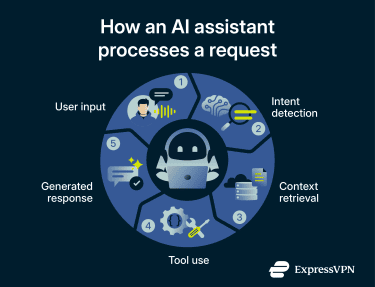
A typical flow looks like this:
- User input: The request arrives as text, voice, an uploaded file, or another supported format.
- Intent parsing: The system breaks down what the user is asking and what kind of response or action it requires.
- Model decision: The underlying model or orchestration layer either generates a response directly or determines which tool, knowledge base, or data source it needs to consult.
- Tool or data lookup: If connected systems are available, the assistant may search a knowledge base, call an API, or run a predefined action.
- Response delivery: The final answer comes back to the user as text, voice, or another supported format.
Output quality depends on the model itself, the prompt, the data the assistant can reach, and the safeguards layered in. That's why two assistants can respond differently to the same request: one may have access to live data, files, or apps, while the other relies only on what it learned during training.
Natural language processing
Natural language processing (NLP) is the field of AI that enables computers to understand, interpret, and produce human language. It's what lets a user type or speak a request the way they'd talk to a person, rather than write a structured command.
NLP combines computational linguistics with statistical modeling, machine learning (ML), and deep learning. Today's mainstream assistants sit on the deep-learning end of that spectrum, with LLMs handling the language work directly. For voice-based interfaces, a speech-recognition layer first converts spoken words into text before the model processes it.
Machine learning and personalization
Today's AI assistants are built around LLMs: deep learning models based on a neural network architecture called a transformer, trained on vast amounts of text data to understand and generate human language. Once a prompt comes in, the model breaks it into tokens, runs them through its transformer, and generates a response one token at a time by predicting the most likely next token.
Personalization sits atop the model. Some products offer explicit memory features the user can review and edit. ChatGPT's memory, for example, lets users see what's stored, ask the assistant to forget things, or turn the feature off, though turning memory off doesn’t automatically delete stored memories. Others use context only from the current session.
Data integration and automation
An AI assistant becomes more useful when it can reach beyond what the model already knows. Enterprise platforms like IBM watsonx Assistant integrate with existing tools such as customer relationship management (CRM) software and messaging platforms, allowing the assistant to operate inside a user's existing workflow rather than as a standalone chat window.
One common technique for handling external information is retrieval-augmented generation (RAG): the assistant connects to an external data source, retrieves relevant information, and uses it to generate the answer. RAG lets the model respond with domain-specific or up-to-date data it wasn't trained on, reducing the likelihood of hallucinations by grounding answers in external content when the retrieved sources are relevant and reliable.
Consumer assistants are also expanding beyond model-only responses. For example, ExpressAI includes live web search and secure file uploads, allowing users to retrieve current information and analyze external content through a conversational interface.
Conversational AI technology
Conversational AI is the broader category of technologies, including chatbots and virtual agents, that users can talk to. It combines NLP with ML to recognize speech and text inputs, interpret their meaning, and respond in a way that imitates human conversation.
Learn more: Narrow AI: The tech behind Siri, spam filters, and fraud alerts.
Types of AI assistants
AI assistants can be grouped by where they're used and who they're built for. Categories often overlap: a phone assistant may also be a voice assistant, and an enterprise tool may use the same chat interface as a personal one. Still, the environment and target user usually set them apart.
| Type | Built for | Common environments | Examples |
| Virtual personal assistants | Individual everyday use | Phones, computers, browsers, standalone apps | Siri, Alexa, ChatGPT, Claude, Gemini |
| Enterprise AI assistants | Workplace and business use | Business software, productivity suites, collaboration platforms, internal knowledge systems | Microsoft 365 Copilot, IBM watsonx Assistant |
| Customer support AI assistants | Service teams interacting with customers | Website chat, in-app messaging, voice systems, contact centers | watsonx Assistant deployments, custom-built support bots |
| Voice AI assistants | Spoken, hands-free interaction, usually supported by speech recognition | Smart speakers, phones, cars, accessibility tools | Siri, Alexa, Google Assistant/Gemini |
What can AI assistants do?
From quick personal tasks to complex business workflows, AI assistants are used in a handful of common ways.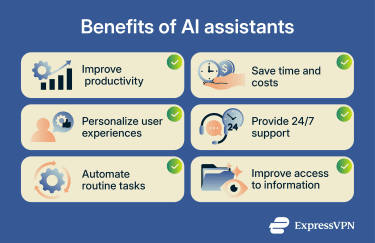
Task automation
AI assistants can handle routine actions that follow a clear request: creating a reminder, filling in a form, routing an inbound message, updating a record, or summarizing information from an approved source.
More advanced setups integrate with existing business tools so the assistant can trigger actions inside other software: querying a database, creating a support ticket, or kicking off an approved workflow. In customer-facing contexts, this means handling common questions and first-line support outside business hours; complex issues still need a human handoff.
What's possible depends on permissions, the assistant's allowed actions, and the oversight in place for confirmation and review.
Also read: Pros and cons of AI: What it means for work, life, and society.
Scheduling and productivity
AI assistants can help organize everyday work. Common examples include drafting emails, summarizing meeting notes, building task lists, or turning scattered notes into a checklist or a clearer message.
The tasks are individually small but recurring, which is where assistants tend to save the most time. Research from McKinsey & Company (a consulting firm) estimates that generative AI could enable labor productivity growth of 0.1–0.6% annually through 2040, depending on adoption and how effectively the time saved is redeployed.
Content creation and research
Many AI assistants draft and shape content (outlines, reports, social posts, translations, brainstorms) from a brief prompt. They can also serve as a starting point for research by explaining a topic, comparing ideas, or suggesting questions worth exploring. First drafts and request triage are where the time savings tend to show up first.
AI-generated output should be checked against reliable sources before being published or shared. Assistants can produce confident-sounding errors known as hallucinations, and quotes, links, statistics, and key claims in particular need verification.
Read more: Can you trust AI-generated content? Understanding accuracy and limitations.
Data analysis and reporting
Some AI assistants can work with structured information: summarizing a spreadsheet, explaining a chart, or turning raw figures into a plain-language report. In business settings, the assistant may connect to a knowledge base or database to retrieve and explain internal data, provided it has permission to access that source. The same connections can also enable the assistant to tailor outputs to the user's role or saved preferences, with privacy trade-offs to manage.
Outputs that inform financial, security, or other high-stakes decisions still need human review before being acted on.
Smart home and voice commands
Voice AI assistants handle hands-free tasks: setting timers, checking the weather, playing music, getting directions, and controlling connected devices like lights, thermostats, and speakers. The commands are usually short and direct, and the assistant responds by speaking back or showing the result on a screen.
Also read: What is the Internet of Things (IoT) and why does it matter in everyday life?
Limitations of AI assistants
AI assistants can be useful for many everyday tasks, but their output still depends on the model, the prompt, and the data available. For important or high-stakes tasks, it’s best to review their responses carefully and verify key details before acting on them.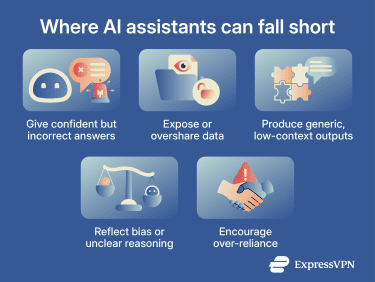
Accuracy and hallucinations
AI assistants can produce information that's wrong, outdated, incomplete, or invented. This is commonly called a hallucination. The National Institute of Standards and Technology (NIST) uses the term "confabulation" to refer to confidently stated but erroneous or false content that can mislead users.
For low-stakes tasks, that may mean correcting a weak draft. For legal, medical, financial, technical, or security-related decisions, important information should be verified against reliable sources before being acted on.
Privacy and security risks
Privacy concerns often begin with the prompt. Users may paste personal, business, customer, or confidential information into an assistant without thinking about how that data is stored, who can access it, or whether it might be used to train future models.
The risk grows when an assistant connects to apps, files, databases, or workplace tools, since broad or poorly configured permissions can expose more context than the user expects.
Security risks include prompt injection, where an attacker plants malicious instructions in a user's prompt or in content the model reads, such as a document, web page, or email. These instructions may try to bypass safeguards, leak data, or trigger unauthorized actions.
Privacy policies vary across providers. It's worth checking what data the tool collects, whether prompts are saved, whether inputs can be used for model training, and what privacy settings or admin controls are available.
Learn more: What is AI phishing, and how can you avoid it?
Ethical concerns
AI assistants can raise ethical concerns around bias, transparency, accountability, and over-reliance. Models can magnify historical or systemic biases and produce discriminatory outputs, and users can drift into automation bias: accepting AI output more readily than they should.
These concerns matter most in high-stakes settings. Healthcare, legal advice, hiring, education, finance, and security decisions often require expert review, clear accountability, and stronger governance than everyday tasks. AI assistants can support work in these areas, but they shouldn't quietly replace human judgment. Users and organizations need to know when AI is involved, who is responsible for the final decision, and when to escalate.
How to choose the right AI assistant
The right AI assistant depends on what it needs to do, what data it can access, and how much control the user wants over its output. Here are key areas worth checking when comparing options:
- Features and capabilities: Match the assistant to the job (writing, coding, scheduling, support, voice). Check which input types it supports (text, voice, images, files, web access, app actions, knowledge bases) and separate must-haves from nice-to-haves.
- Integration compatibility: For personal use, that means the calendar, browser, notes app, and smart devices already in use. For business use, that means internal documents, ticketing systems, databases, and identity management. Teams should also check support for access permissions, logging, approval workflows, retention, and compliance controls.
- Ease of use: A clear interface, understandable settings, and simple correction options usually matter more than feature count. For teams, also factor in onboarding, documentation, and admin tooling.
- Security and privacy: Check how the tool handles prompts, uploads, conversation history, deletion options, data retention, model training, encryption, and permissions, especially differences between free, personal, and business plans. For sensitive use, prioritize clear privacy, security, and governance controls over extra features.
- Pricing and scalability: Paid plans vary in usage limits, model quality, file support, admin controls, and integrations. For businesses, also factor in setup effort, training, governance, support, data export, vendor lock-in, and long-term operating costs.
Also read: DeepSeek vs. ChatGPT: Which AI tool protects your data better?
The future of AI assistants
AI assistants are likely to become more capable, more connected, and more common inside everyday software. The biggest changes will likely come from three areas, as explained below.
Multimodal AI assistants
Multimodal capability is already becoming standard in leading AI assistants. Frontier products from OpenAI, Google, and Anthropic increasingly accept combinations of text, images, audio, files, and live screen or camera context. What’s still changing is how assistants use those inputs in practice. A few shifts are underway:
- From describing to doing: Until recently, an assistant could explain what was on a screen. Anthropic's "computer use" capability lets Claude interact with a computer interface in supported environments, such as clicking, typing, and using tools, instead of only telling the user what to do.
- From single snapshots to continuous, live context: Today, a user usually uploads a photo or screenshot and asks a question. Increasingly, assistants can take in a continuous stream (a live camera feed, a screen share, a real-time conversation) and respond as it happens. Google's Project Astra research has influenced Gemini Live features such as real-time camera and screen sharing, pointing toward assistants that can work with ambient context through phones, screens, and prototype glasses.
On-device AI
A separate shift is reshaping where AI assistants actually run. Apple, Google, and Microsoft are moving more AI processing onto users’ own devices, reducing how much data has to leave the device for supported tasks:
- Apple Intelligence: Processes many requests on supported iPhone, iPad, and Mac devices. When a request needs more capability, it can use Private Cloud Compute, which Apple says processes relevant data without storing it or making it accessible to Apple.
- Gemini Nano: Runs on supported Android devices through Android’s AICore system service, enabling local generative AI use cases such as summarization, proofreading, rewriting, image description, and speech recognition without sending data to the cloud.
- Copilot+ PCs: Combine the CPU, GPU, and a dedicated neural processing unit (NPU) to run some AI features locally and support hybrid AI experiences split between the PC and cloud.
For privacy-conscious users, this is one of the most consequential structural changes in the space. When a task is fully processed on-device, the prompt doesn't need to be sent to the provider’s cloud, which can reduce third-party logging, retention, training, and breach exposure.
FAQ
What is the difference between an AI assistant and a chatbot?
Is ChatGPT considered an AI assistant?
What is the best AI assistant?
Are AI assistants safe to use?
How do AI assistants protect user privacy?
What industries use AI assistants the most?