
Expressvpn Glossary
Network map

What is a network map?
A network map is a visual representation of a network’s topology and components. It shows how devices and subnetworks relate to one another and where connections exist between systems. Network mapping is the process of discovering, collecting, and displaying this information in a clear visual form.
Network mapping tools can include network discovery tools such as Nmap, as well as dedicated network visualization or topology-mapping platforms. Some router or management interfaces may also provide basic views of connected devices.
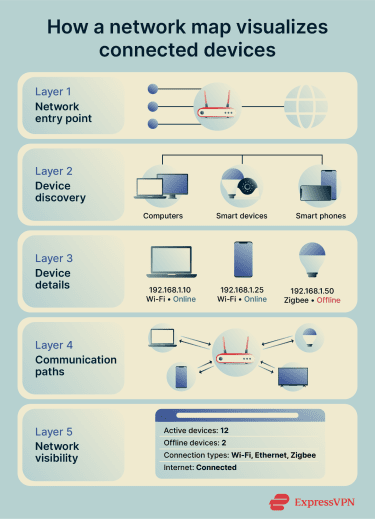
What a network map shows
Network maps typically display a defined set of structural and operational details that describe how a network is organized and how its components relate to one another.
- Connected devices across networks: Network maps show the devices connected within a local area network (LAN) and, in some cases, across wide area networks (WANs). These devices appear as nodes in the mapped environment, helping clarify which systems are part of the network.
- Links between network components: Network maps illustrate how routers, switches, and endpoints connect. These links represent the relationships or paths between network nodes, making the structure easier to understand.
- Overall network topology: Network maps can visualize the network’s arrangement using layouts such as star, mesh, or hybrid topologies. This helps explain how the network is organized at a high level.
- Device roles, addresses, and status: Some network maps also expose device roles along with management details such as IP addresses and communication links. They may also show system architecture, security devices, and internal or external connections. This information provides context about how individual components function within the network. However, the exact level of detail depends on the tool.
- Communication paths: Some logical network maps show how systems communicate across segments or how resources relate to one another. However, not all network maps display live traffic flow unless monitoring or analytics features are included.
Most network maps display similar core elements, but what they emphasize depends on the map type or tool:
- Logical: Focuses on data flow, routing paths, and how devices communicate.
- Physical: Documents hardware placement, cables, ports, and real-world connections.
- Live or monitored views: May display current status, active alarms, and connectivity information, depending on the tool.
Why network maps matter
Troubleshooting and device tracking
Some network maps show live device, link, and alarm data in one place. Teams can move from the map to detailed information about a specific device or connection when investigating issues. Displaying device data within the topology helps trace connectivity problems between systems. This approach reduces the time required to locate and understand faults.
Spotting unauthorized devices
Some network maps display detected hosts and network devices along with their connections. This visibility helps highlight devices that appear unexpectedly within the topology. In tools with monitoring features, alarms, or fault information may provide additional context for investigating unmanaged or unrecognized systems.
Identifying performance bottlenecks
Network topology influences how data flows between devices. Topology views help show where connections are concentrated and how systems are interconnected, which supports performance analysis and capacity planning. By clearly visualizing the network structure, teams can better assess where bottlenecks may occur.
Planning upgrades or expansions
Topology design affects scalability and overall network management. Understanding the existing structure helps assess how easily the network can add new devices or extend to new locations. Maps provide a clear reference for evaluating design limits and planning changes.
Risks of not mapping a network
Unknown or misconfigured devices create security gaps
Incomplete visibility can leave devices unmanaged and improperly secured within the network. Weak asset and configuration management can also leave hardware and software inventories incomplete or outdated. Operational changes can also introduce security gaps over time, creating unintended entry points into the network.
Outdated maps leave blind spots
Incident analysis benefits from accurate, organization-specific knowledge of the network environment. When documentation becomes outdated, teams lose important context about infrastructure and configuration changes. This can force responders to rely on assumptions instead of verified information, increasing the risk of errors during incident handling.
Poor segmentation makes attacks easier
Insufficient network segmentation can allow attackers to move laterally once they gain access. Without clear internal boundaries, attackers can pivot more easily between systems. Internal segmentation helps isolate sensitive resources and limit movement.
Further reading
- What is network mapping? Tools and security best practices
- Network topology: Best practices for modern networks
- Network configuration management for secure networks