What is routing, and why does it matter in networking?



Every single second, incalculable quantities of data travel between networks and devices, and it’s important to ensure that this data flows quickly and efficiently from point A to point B.
That’s where routing comes in. This guide dives into the network routing process in detail, exploring how it works and looking at the most important routing types and protocols.
What does routing mean in networking?
In a nutshell, routing is the process of selecting a path for data packets to travel through when moving from one network to another. It’s carried out by network layer devices, such as routers and gateways, and its end goal is to ensure that data moves in the most efficient way from its source to its destination.
Why routing is critical in computer networks
Routing is a fundamental process in modern computer networks, providing the following essential benefits:
- Efficiency: Routing facilitates the optimal flow of data and network traffic, minimizing the risk of congestion, disruptions, and delays.
- Scalability: Dynamic routing protocols help networks remain operational and efficient even as they expand.
- Security: Modern routing protocols implement security features, including authentication, to provide networks with some protection against certain types of cyberattacks.
- Redundancy: Routing protocols can identify backup or alternative paths for data to follow if link failures occur or initial pathways become blocked.
- Internet connectivity: It’s thanks to routing protocols like the Border Gateway Protocol (BGP) that the internet is able to function.
How does routing work?
At a fundamental level, the way routing works is relatively simple, with data essentially hopping from router to router until it reaches its final destination. Here’s a closer look at the full process, step-by-step.
From data packet to destination
- Data packet creation: When you click a link, send a message, upload a file, or send any other sort of data to another network, your device breaks that data down into packets, labeling each one with a source IP address (your device’s address) and a destination IP address (where the data should be delivered).
- Data is sent to the router: Once labeled and prepared, data packets move from your device to your router, which then consults its own list of routing pathways, called a routing table, to work out the optimal route to forward the data closer to its destination.
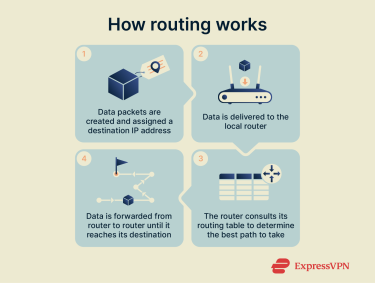
- Data moves to subsequent routers: Typically, the process above will repeat on multiple routers as the data passes between them, with each one using its own routing protocols (rules that decide on the best ways to deliver data) and tables to forward the packets further and further along. Each movement between routers is called a “hop.”
- Data reaches its destination: Eventually, after sufficient hops have been made, the data arrives at the local router for its destination network. From there, Layer 2 switches typically take over, forwarding the packet within the local network to the correct device based on its Media Access Control (MAC) address.
Core components of routing
Routing relies on several core components, including routing protocols, which are like frameworks or rules that tell routers how to determine the optimal paths for data to travel along, and routing tables, which are like maps for routers, helping them pick which specific paths to use.
Routing tables explained
Every router has its own internal routing tables, containing the data it uses to decide where to send data packets next. Each table usually contains three core pieces of information:
- Destination network: This tells the router which IP addresses are along the route to the destination.
- Next hop: This tells the router which is the next most efficient hop to make to get the data where it needs to be.
- Interface: Finally, this tells the router which of its physical ports it should use to send the data onwards.
Here’s a simple example to illustrate how this works:
- A data packet arrives at a router with the destination IP address of 172.16.254.1.
- The router consults its routing table to find that specific destination network.
- The table shows that for this specific IP address, the ideal next hop is to IP 192.168.0.1, and the right port to use is eth1.
- The router sends the data on its next hop to 192.168.0.1 via port eth1.
Routing metrics and administrative distance
Several important metrics help to measure routing performance and identify the best possible paths for data to travel along. These include:
- Hop count: The number of routers a packet has to pass through to reach its destination.
- Delay: How long it will take for the packet to reach its destination.
- Bandwidth: The maximum amount of data a network connection can support.
Another important metric is administrative distance (AD), which is almost like a trust rating for various routing paths. Each path has its own numerical AD value, and the lower the number, the more “trusted” the route is. So, when presented with two paths to the same destination, routers will usually opt for the one with the lowest AD.
Real-world examples of routing in action
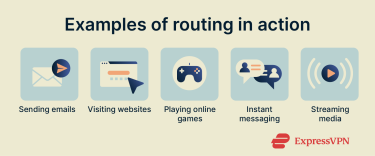
Users experience the real-world effects of routing every day when connecting to websites, streaming media, downloading files, sending messages, working remotely, etc. Here are some examples:
- Sending emails internationally: When you write an email and click the “Send” button, your email client converts your message into data packets, which are then routed across the globe with the aid of internet infrastructure, like underwater fiber-optic cables, before reaching the recipient’s email provider and arriving in their inbox.
- Visiting websites: When you type a web address into your browser bar and hit the “Enter” key, your device sends data packets to your home router, which then routes the data onward to your internet service provider (ISP). The packets then continue across multiple routers to reach the servers or data centers of the site you want to access.
- Playing online games: When you play games online, your computer or console constantly creates and delivers data packets to the game’s servers. Routers aim to pick the paths that are as fast as possible, keeping latency, or delay, to a minimum so you can enjoy the most responsive online gaming experience.
Deep dive into routing protocols
Like routing tables, IP routing protocols are essential elements of the routing process. A simple way to think of them is like rulebooks or instruction manuals. They provide the data that routers use to automatically share information with one another in order to update and refine their routing tables, and this, in turn, helps them deliver data packets as efficiently as possible.
If these protocols didn’t exist, routing tables would always have to be updated manually. They help in optimizing and balancing the flow of data between networks, dealing with delays or disruptions, and scaling network operations to suit even the largest and most complex environments.
Common routing protocols
There are many routing protocols responsible for path determination in networks, but some are used much more frequently than others. Here’s a closer look at some of the most common examples.
BGP
Border Gateway Protocol (BGP) is the primary routing protocol used for routing data across the internet. It’s part of the internet backbone, helping to provide a stable and efficient exchange of enormous amounts of data. It works by analyzing a range of factors, like policy rules and path length, to determine the optimal path for data to take. Unlike internal protocols that focus on shortest paths, BGP is primarily policy-driven, meaning it chooses routes based on administrative preferences and relationships between autonomous systems rather than just distance or speed.
OSPF
Open Shortest Path First (OSPF) is a protocol that uses a special algorithm (the Dijkstra algorithm) to calculate the shortest and fastest possible routes between two routers. It works well for internal routing across large business networks and is, along with BGP, one of the two most commonly used routing protocols.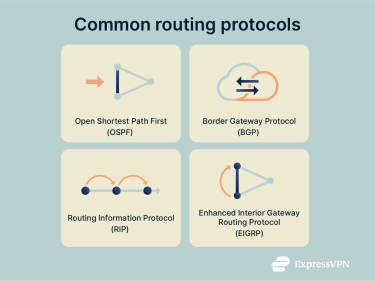
RIP
Routing Information Protocol (RIP) is one of the older routing protocols still in use today. It uses hop count as its main metric to work out the best path for data to take, trying to keep the number of hops to a minimum wherever possible. It’s not the most scalable protocol, since it always restricts the maximum hop count to 15, so it can struggle on larger networks.
EIGRP
Enhanced Interior Gateway Routing Protocol (EIGRP) is a protocol developed by U.S. tech company Cisco. It aims to combine the best elements of various types of protocols to keep bandwidth usage to a minimum, taking numerous elements into account (such as reliability, load, and bandwidth) to pick the perfect path for data to follow. Technically, EIGRP is a hybrid protocol, blending aspects of distance-vector and link-state routing to improve speed and scalability.
How to choose the right routing protocol
With multiple protocols to pick from, choosing the right one is a question of assessing your network’s size, type, and needs. You’ll need to think about various factors, including scalability, speed, complexity, and efficiency. Different protocols have strengths in different areas: for example, OSPF handles large internal networks efficiently, while BGP is good at connecting to external networks at scale.
Many organizations use a hybrid approach, running multiple protocols in different parts of the network or even together on the same network segment. This lets them take advantage of each protocol’s strengths while maintaining flexibility and redundancy.
Routing types explained
Routing doesn’t just follow a single fixed structure. It can work in various ways, with different protocols, purposes, and functions. Here’s a closer look at some of the main routing types.
Static routing
In static routing, network administrators manually configure routing tables and define which paths data packets should take, rather than relying on automatic updates from dynamic routing protocols.
This method is relatively simple to set up and works well for smaller networks. It also uses minimal system resources. However, static routing requires regular monitoring and manual updates to avoid delays or disruptions, and it doesn’t scale well for larger or more dynamic networks where paths frequently change.
Dynamic routing
Dynamic routing is, essentially, the opposite of static routing. In this method, routing protocols are used to automatically update and manage routing tables, without the need for manual configuration or intervention.
This results in more dynamic and often more efficient performance, as routers always have the latest data available to them when working out which paths data should take. It works well for larger networks, can ease the burden on admins, and can easily scale up accordingly as new devices are added, but it does consume more computing power than static routing. It’s also generally less secure than static routing, because automatic updates can be exploited if routing information isn’t properly authenticated.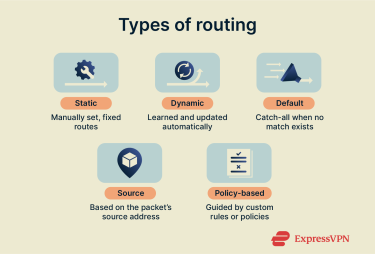
Default routing
With default routing, routers are configured so that if they can’t find a suitable path for a data packet to take, they automatically send it on a specific, preset path instead, regardless of where it came from or what its final destination is.
Default routing is most commonly used by stub routers, which are those that only have a single route to reach other networks. It’s straightforward to set up and can work well on smaller and simpler networks. But, like static routing, it’s not the best option for larger networks and can result in inefficiencies when delivering data from source to destination.
Source routing
Source routing is when the sender (source) of the data decides exactly which path it should take to reach its destination, rather than routers deciding each hop along the way. Essentially, the source writes and dispatches the instructions along with the data, and routers simply follow them.
Source routing allows network admins to dictate the exact paths they want their packets to take, which can help in optimizing routes and minimizing latency. It’s also helpful for testing specific network segments or routes. However, it’s generally not used on the internet, with many routers automatically blocking or overriding source-routed packets.
Policy-based routing (PBR)
PBR involves network admins defining specific paths for data packet transmission that follow their own custom policies. They can set certain criteria, like source address, protocol type, and application requirements, and this can help in optimizing routing performance and data security.
This method can be suitable for enterprise networks, giving admins highly precise levels of control over their data routing without resorting to source routing. On the downside, it can be difficult to configure and manage the various rules and policies involved, especially on extensive or complex networks.
Routing algorithms overview
Routing algorithms are the mathematical methods that routers use to calculate the best paths through a network. Different algorithms are implemented by different routing protocols, and they broadly fall into three categories:
Distance vector routing
Distance vector routing involves routers regularly communicating with one another to exchange up-to-date routing and network information. Protocols then use the Bellman-Ford algorithm to identify the shortest possible path between nodes. RIP is an example of a distance vector algorithm.
Link-state routing
Link-state routing is when routers build detailed maps of their networks by sharing information with all other routers in their area. They can then use those maps to determine the most efficient path, based on metrics like speed and bandwidth, to deliver data. This algorithm is used in protocols like OSPF.
Path-vector protocols
Path-vector protocols look further than just the next hop by having routers share the entire path a route takes. Instead of calculating shortest paths, path-vector protocols choose routes based on policy, AS-path information, and other attributes, making them well-suited for routing between autonomous systems on the global internet. BGP is the primary example of a path-vector protocol.
Router and gateway configuration tips
Configuring your router or gateway correctly is key to ensuring that data enters and leaves your network smoothly and efficiently. Here is some guidance on what to expect when setting one up.
Basic router setup for routing
Basic router setup simply involves connecting the router to your modem or upstream network and then accessing the router’s interface, which you can usually do by opening a web browser on a connected device and entering the router’s IP address into the address bar. You can then log in using your router credentials.
From there, you can change your router’s login and password, set your default gateway, configure local area network (LAN) and wide area network (WAN) settings, and adjust Domain Name System (DNS) settings. Some routers also let you select different routing types and protocols, block IP addresses, set up subnets, or manage firewall rules.
Casual users may want to leave most of these settings in their default states, but expert admins can adjust them to fine-tune routing behavior, security, and performance in more complex environments.
Common configuration errors
Network admins may encounter a range of errors and oversights when adjusting their routing settings, selecting protocols, or updating tables. Here are some examples and ways to avoid them:
- Incorrect IP addresses: This often occurs when two devices are accidentally assigned the same address, creating a conflict that stops one or both of them from communicating properly. Admins need to ensure that every device has its own unique IP, typically by using Dynamic Host Configuration Protocol (DHCP) reservations or static address assignments.
- Routing table errors: These are caused by routing tables that may be misconfigured or outdated, leading to inefficient or disrupted data transmission. Admins should regularly verify table accuracy by checking that each route matches the intended network design (for example, confirming next-hop IPs, subnet masks, and interface assignments). Using dynamic routing protocols can also help, as they automatically update routes based on current network conditions.
- Default credentials: Using the default login credentials for a router can leave it exposed to infiltration and attacks. Users should change the password to a unique and strong one as quickly as possible and enable management protections such as HTTPS access, multi-factor authentication, and limiting admin access to trusted networks.
- Asymmetric routing: This happens when outbound and inbound traffic take different paths. It becomes a problem for networks that use stateful devices, like firewalls or Network Address Translation (NAT), which expect to see both sides of a connection. If return traffic arrives via a different route, it may be dropped. To prevent this, ensure routing symmetry where required or use policies that keep return traffic on the correct path.
How configuration affects network performance
Router configuration can have a huge impact on network performance, potentially affecting speed, stability, and reliability in the following ways:
- Routing table size: Larger tables require more CPU and memory to update and maintain. On smaller or software-based routers, this can slow down route processing and convergence, while well-optimized or hardware-accelerated routers can handle larger tables more efficiently. Keeping tables clean and avoiding unnecessary routes helps improve stability and performance.
- Routing protocol: Protocols vary in how quickly they converge, how much bandwidth they consume during updates, and how complex their calculations are. Choosing the right one is key for the fast, smooth flow of data.
- Settings: Features such as NAT, firewalls, and deep packet inspection introduce extra processing steps. This can increase latency or reduce throughput on devices that lack sufficient hardware acceleration.
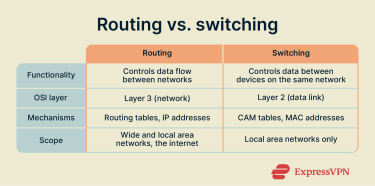
Routing vs. switching
Switching and routing both revolve around moving data from place to place, but with several important differences:
- Core function: Routing controls the flow of data between networks, while switching controls data transmissions between devices on the same local network.
- Open Systems Interconnection (OSI) layer: Routing occurs at Layer 3 of the OSI model (the network layer), while switching happens at Layer 2 (data link).
- Main mechanisms: Routing uses routing tables and IP addresses, while switching is dependent on Content-Addressable Memory (CAM) tables and MAC addresses.
- Network scope: Routing applies to LANs as well as WANs and the wider internet. Switching is primarily used in LANs, although modern switches can support Layer 3 routing and may be used in larger provider networks.
How routing and switching work together
While routing and switching are different processes, they’re closely interconnected and can work together to facilitate the flow of data to where it needs to go. Switching handles the movement of traffic on local networks, from device to device in a small area, while routing can take that same data further, to other networks all over the globe.
For example, if you want to send a file or piece of data from your computer to another device on a different network, switching is first used to deliver that data to your router. From there, the routing process takes over, sending the data to the other network. Once it arrives on that network, switching again initiates to deliver the data to the exact device it was intended for.
FAQ: Common questions about routing
What are the main types of routing?
The main types of routing include static, dynamic, and default routing. Each type is unique, with static routing requiring manual configuration, dynamic routing relying on protocols to automatically update routing pathways, and default routing sending all traffic to a specific, single router. Each routing type has its benefits, drawbacks, and ideal use cases.
How do routers decide where to send data?
First, the routers read the destination IP address of each data packet before consulting their own internal routing tables, which contain lists of network destinations and optimal network paths. They use the data in those routing tables to determine the next router or device, otherwise known as the “next hop,” to send the packet onto.
What's the difference between static and dynamic routing?
Static routing revolves around manually configuring routes in a network, while dynamic routing relies on routing protocols to automatically identify and update routes. On a broader level, static routing is the simpler of the two and is well-suited to small and stable networks, but it can be quite complex to manage on larger networks. Dynamic routing is more adaptable and scalable, making it the better choice for most large networks, but it’s less secure and requires more computing power than static routing.
What makes a routing table efficient?
The most efficient routing tables are those that contain the most accurate and up-to-date routing information to deliver data packets to their destinations as quickly as possible. Dynamic routing protocols play a part in optimizing routing tables by automatically updating entries over time. The table shouldn’t be too large, as this can cause performance issues on some routers, leading to slower decisions and data delays.
Take the first step to protect yourself online. Try ExpressVPN risk-free.
Get ExpressVPN